















We have started to build up a comprehensive latency database for input devices, which is intended to make systematically measurable differences between individual models transparent. We are starting with wired mice, which were measured under identical test conditions. The tests are based on NVIDIA’s second-generation LDAT (Latency Display Analysis Tool), which allows precise end-to-end measurement of the entire signal runtime from the mouse click to the visible reaction on the screen. The test was carried out on an AOC AGON Pro AG276QZD2 with a refresh rate of 240 Hz.
The measurement is carried out via a light pulse that the LDAT sensor recognizes as soon as a mouse clicks and the image content changes – typically a specially prepared test image. The sensor counts the exact time between mouse contact and the image change on the monitor. This method makes it possible to combine external delays such as USB polling, internal signal processing and the rendering time of the monitor into a single key figure. This gives us a realistic picture of the actual response time of an input device in real operation.
We will successively expand this database and in future also take a close look at mechanical keyboards and their signal delay. Not only the switches, but also the controller firmware and USB behavior will be taken into account in order to provide a complete picture. Anyone interested in the technical background can find a detailed basic article on the measurement technology used and how to interpret the results at the bottom of the page.
Charts of the wired mice (USB)
The evaluation of the wired mice clearly shows how much modern sensor technology, controller firmware and high USB polling rates can affect the measured end-to-end latency. At its peak, the Razer Viper 8K with activated 8000 Hz polling achieves an average latency of just 9.5 milliseconds – a value that seems almost absurdly low given the large number of processing steps involved. The Endgame Gear XM1R with classic 1000 Hz sampling follows close behind at 9.7 milliseconds, which positively underlines its optimized signal processing and minimalist firmware. After that, there is a noticeable gap: Many of the popular mainstream mice – including Logitech G502 or ASUS ROG Chakram X – are in the 11 to 13 ms range. Individual models such as the Roccat Kone or the Sharkoon SGH3 only fall significantly in the lower third with 23 to almost 25 ms, which suggests longer internal processing paths, weaker microcontrollers or unfavorable polling implementations.
The fact that an 8000 Hz polling rate achieves a measurable improvement at all illustrates the performance of modern USB controllers – even if these values are almost digital voodoo. This is because in order to be able to use 8000 polls per second sensibly, all other system components – from the operating system to the USB stack to the image output – must also work correspondingly quickly and synchronously. A polling rate of 1000 Hz already means that a signal is processed every 1 ms at the latest; at 8000 Hz it is only 0.125 ms. This difference is actually measurable with optimum tuning, but the question arises as to its practical relevance – especially in the context of biological reaction times.
For comparison: even extremely well-trained fighter pilots or e-athletes achieve reaction times of around 150 to 180 ms in reaction tests, while pure muscle reactions are around 70 to 100 ms – and this under optimal conditions. The mouse itself therefore only accounts for a fraction of this. This means that whether a mouse needs 10 or 15 milliseconds can hardly be perceived by the human nervous system in real time. Nevertheless, in a performance-optimized system, the smallest delays add up to a measurable advantage – especially with high-frequency movements and flicks, where every millisecond allows additional accuracy or timing.
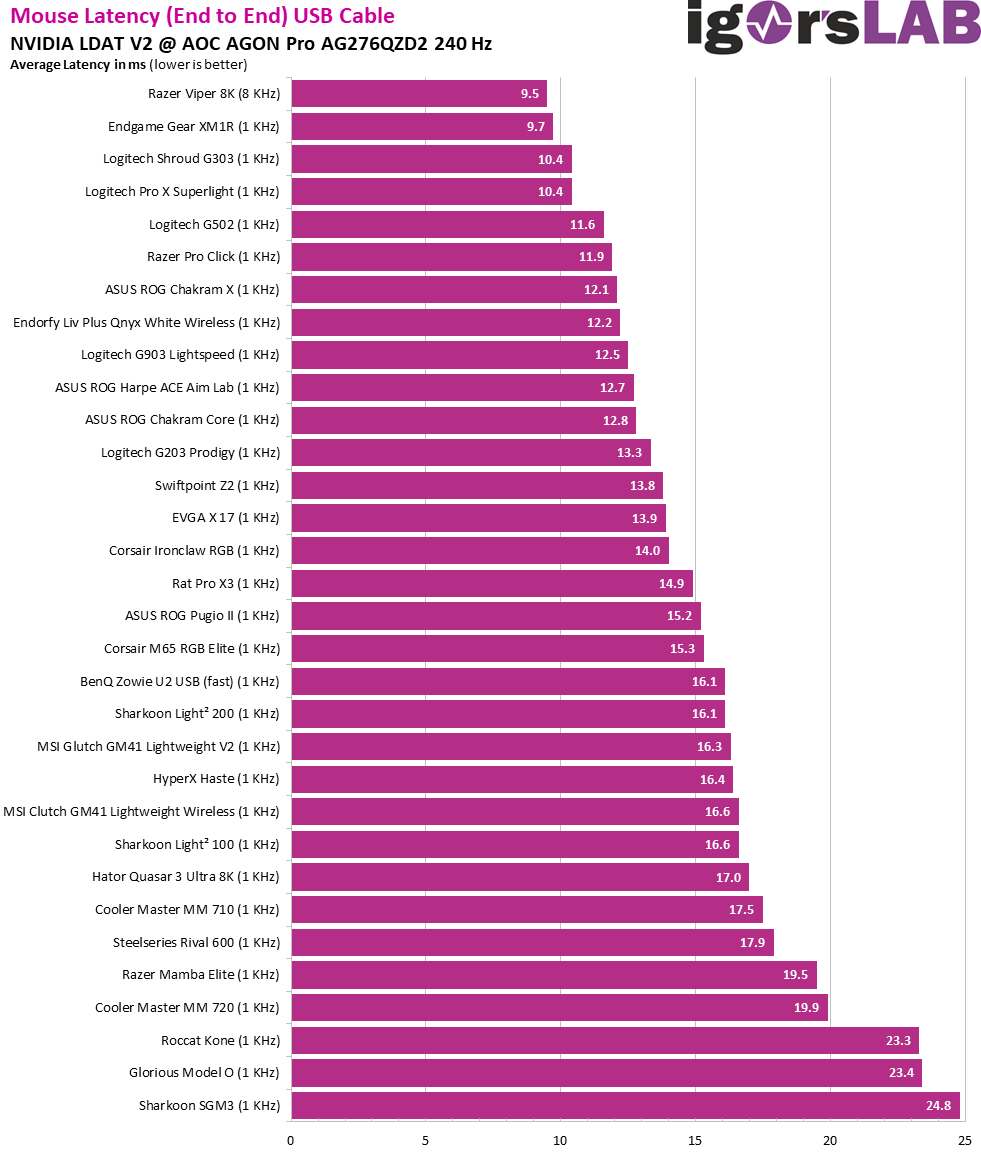 The findings from these charts are double-edged: on the one hand, the results show what is technically possible today. On the other hand, they also illustrate how close input technology now comes to the biological limits of human perception – and how little scope there actually is for noticeable improvements. However, if you are looking for maximum consistency and minimum delay, you will find devices in the upper ranks of the measurement that meet these requirements at the highest technical level.
Charts of the wireless mice
The evaluation of the wireless mice shows that modern 2.4 GHz connections with a polling rate of 1000 Hz are by no means a significant disadvantage compared to wired solutions – as long as the implementation is of a high quality. The Logitech Shroud G303 is at the top of the list with a measured end-to-end latency of 10.6 ms, which corresponds roughly to the level of well-optimized wired mice. Other models such as the Razer Pro Click, Logitech G903 Lightspeed and ASUS ROG Harpe ACE Aim Lab are only just above this with values between 12.1 and 12.6 ms and underline the fact that reliable wireless operation no longer has to mean a noticeable delay.
It is noticeable that the difference between individual manufacturers and even between different dongle generations of the same product line is significantly greater than with the wired versions. While the Logitech ProX Superlight is still in the upper mid-range with 12.9 ms, the ASUS ROG Chakram X, for example, is already slightly slower at 14.6 ms – even though it uses the same type of transmitter as the Harpe ACE. This is even more evident in the ASUS ROG Pugio II or the MSI Clutch GM41 Lightweight, both of which require over 16 ms. This is often due to additional processing steps at the firmware level, more complex energy management or poorer interrupt prioritization in the microcontroller.
In the lower third are models such as the Hator Quasar 3 Ultra 8K or the Zowie U2 in two different wireless modes, which achieve values just below or even above 20 ms despite nominally fast transmission. The Sharkoon SGM3 once again brought up the rear with 24.7 ms, which indicates in particular a slower receiver and non-optimized protocol. These measurements show that “wireless” does not automatically mean “equivalent” – it depends crucially on the overall chain of sensor, signal processing, USB receiver and firmware handling.
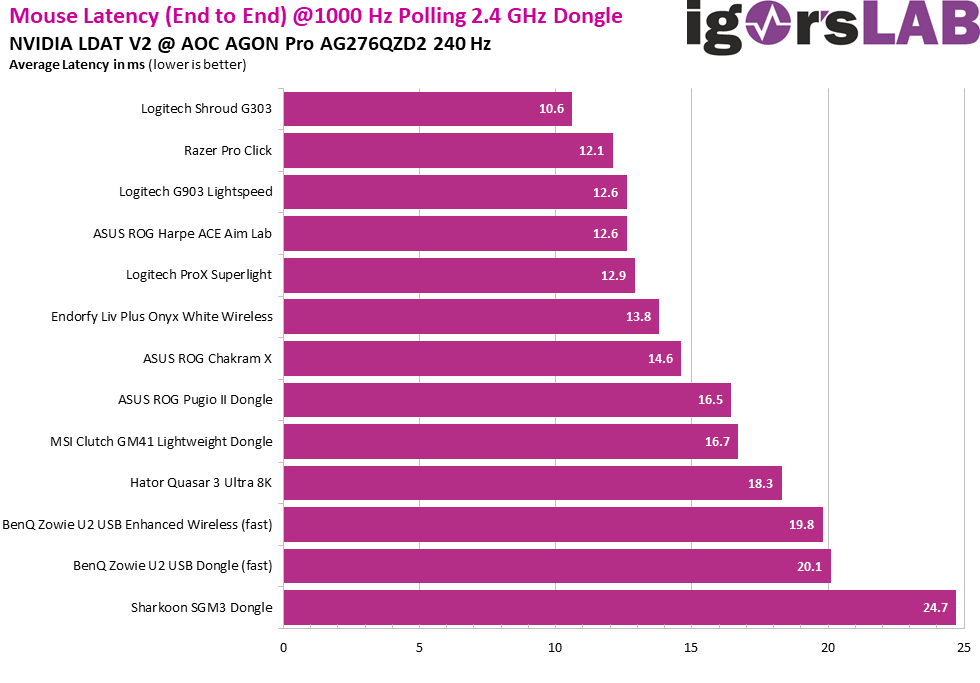 The result makes it clear that wireless technology is now competitive at a high level. It is crucial that manufacturers not only focus on high polling rates, but also consistently optimize all internal paths. Particularly in models with integrated energy-saving mechanisms or several operating modes, the latency can quickly double if the “fast mode” is not permanently activated. For demanding users, it is therefore advisable to take a look at such measured values – especially if minimal delay is crucial for use.
Comparison between wired and wireless operation
This third graph shows a direct comparison of end-to-end latency between wireless and wired operation with identical mouse types. The orange bars represent the measured latency times in wired mode, the pink bars stand for wireless operation via 2.4 GHz radio with 1000 Hz polling rate. It is clear that with high-quality models such as the Logitech Shroud G303 or the ProX Superlight, the difference between the two operating modes is minimal – sometimes in the region of just 0.2 ms. Even with the Razer Pro Click, G903 Lightspeed or the ASUS Harpe ACE, the difference is hardly worth mentioning and is less than 1 ms in each case. This shows that well-implemented wireless transmissions can now perform almost on a par with cable connections.
The situation is different for the models in the mid and lower range: The ASUS ROG Chakram X, for example, shows a difference of around 2.5 ms, while the Pugio II and the MSI GM41 Lightweight each lose over 1.5 ms when switching to wireless mode. This is particularly evident in the BenQ Zowie U2 variants and the Hator Quasar 3 Ultra, where the latencies increase by over 3 ms in wireless mode in some cases. The Sharkoon SGM3 also brings up the rear here with almost identical, very high delays in both operating modes, which indicates fundamental deficits in the internal signal path.
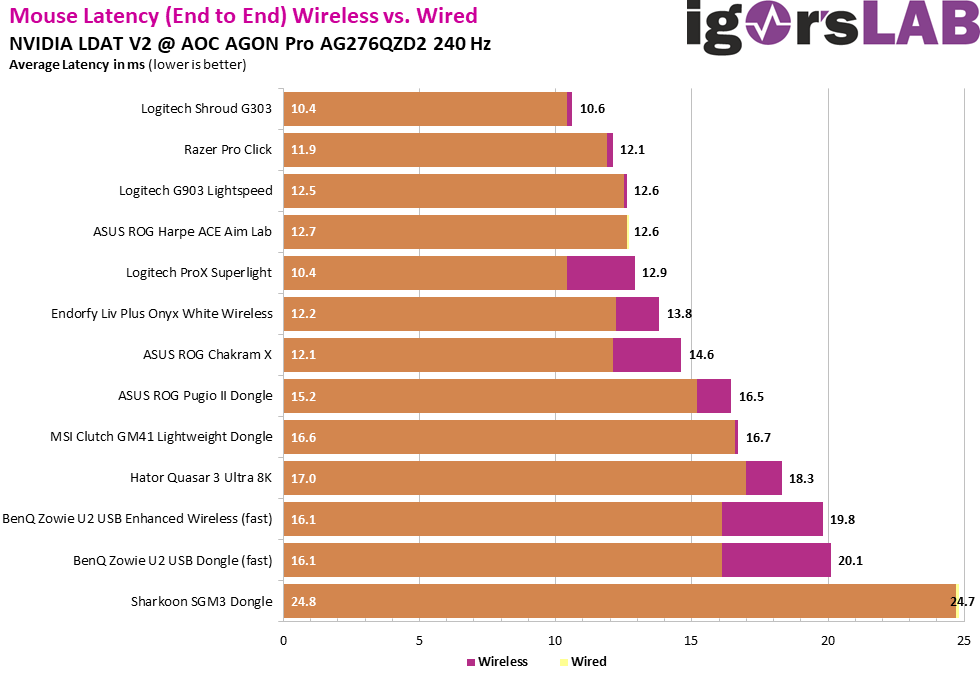 This comparison makes it clear that not every wireless mouse is automatically “slow”, but the quality of the wireless implementation varies greatly. While top models are almost latency-neutral, less expensive or technically less consistently implemented variants have measurable disadvantages. Anyone who is dependent on absolute reaction speed should therefore not only keep an eye on the polling, but also on the entire chain of sensor technology, wireless module, firmware and USB dongle.























4 Antworten
Kommentar
Lade neue Kommentare
Neuling
1
Moderator
Neuling
Alle Kommentare lesen unter igor´sLAB Community →